
38. 批次校正#
关键要点
由于 ADT 数据中存在明显的批次效应,建议使用 Harmony 等方法进行批次校正——这些方法最初是为转录组数据设计的,它们能有效整合样本,同时保持细胞类型之间的区分。
环境设置
安装 conda:
在创建环境之前,请确保 conda 已安装在您的系统中。
保存 yml 内容:
将 yml 选项卡中的内容复制到名为
environment.yml的文件中。
创建环境:
打开终端或命令提示符。
运行以下命令:
conda env create -f environment.yml
激活环境:
创建好环境后,使用以下命令激活它:
conda activate <environment_name>
替换
<environment_name>,名称就是在environment.yml文件中指定的那个。在 yml 文件里,它看起来像这样:name: <environment_name>
验证安装:
通过运行以下命令,检查环境是否创建成功:
conda env list
name: surface-protein
channels:
  - conda-forge
dependencies:
  - python=3.13
  - scanpy=1.12
  - muon=0.1.7
  - python-igraph=1.0.0
  - ipykernel=7.2.0
  - pip==26.0.1
  - pip:
      - lamindb==2.3.1
      - harmonypy==0.0.9
获取数据和笔记本
本书使用 lamindb,并通过 theislab/sc-best-practices 实例 来存储、共享和加载数据集与笔记本。感谢 Lamin Labs 提供免费托管服务。
安装 lamindb
安装 lamindb Python 软件包:
pip install lamindb
可选择创建 lamin 账户
按照以下 说明 注册并登录。
验证你的设置
运行
lamin connect命令:
import lamindb as ln

ln.Artifact.connect("theislab/sc-best-practices").df()
你现在应该看到最多 100 个存储的数据集。
访问数据集(Artifact)
在 Artifacts 页面 搜索该数据集。
加载一个 Artifact 及其对应的对象:
import lamindb as ln
af = ln.Artifact.connect("theislab/sc-best-practices").get(key="key_of_dataset", is_latest=True)
obj = af.load()
该对象现在已可在内存中访问,并可用于分析。请调整
ln.Artifact.connect("theislab/sc-best-practices").get("SOMEIDXXXX")后缀以获取相应的版本。访问笔记本(Transform)
在 Transforms 页面 搜索该笔记本。
加载笔记本:
lamin load <notebook url>
这会把笔记本下载到当前工作目录。与
Artifacts类似,你可以调整后缀 ID 来获取旧版本。
38.1. 动机#
正如我们前面对 ADT 数据所做的可视化所示,不同供体之间的批次效应非常明显(见 降维)。因此,需要进行批次校正来减轻这种影响。
这里我们使用 Harmony。目前还没有针对 ADT 数据对不同批次校正方法做过基准测试。因此,我们选用 Harmony——它在 scRNA-seq 数据上经过基准测试,效果良好。
最近,有两种针对 ADT 数据的批次校正方法发表在知名期刊上和/或由知名作者提出:ADTnorm [Zheng et al., 2025] 和 CytoVI [Ingelfinger et al., 2025]。这两种方法可能适用于 ADT 数据。不过,如前所述,这里我们坚持使用 Harmony,因为它更成熟、且经过了独立的基准测试(尽管是针对转录组数据,而非 ADT 数据)。
38.2. 环境设置#
import warnings

import muon as mu
import scanpy as sc

warnings.filterwarnings("ignore")
mu.set_options(pull_on_update=False)
sc.settings.verbosity = 0
sc.set_figure_params(
    dpi=80,
    facecolor="white",
    frameon=False,
)

import lamindb as ln

ln.track()
→ found notebook batch_correction.ipynb, making new version
→ created Transform('4LJehi0GPRuj0003', key='batch_correction.ipynb'), started new Run('9GLRcMWow8KIOWYb') at 2026-04-10 17:31:12 UTC
→ notebook imports: lamindb-core==2.3.1 muon==0.1.7 scanpy==1.12
• recommendation: to identify the notebook across renames, pass the uid: ln.track("4LJehi0GPRuj")
38.3. 加载数据#
我们载入上一章 降维 末尾保存的 MuData 对象:
af = ln.Artifact.connect("theislab/sc-best-practices").get(
    key="surface-protein/cite_dimensionality_reduction.h5mu", is_latest=True
)
mdata = af.load()
mdata
MuData object with n_obs × n_vars = 117951 × 36737
  var:	'gene_ids', 'feature_types'
  2 modalities
    rna:	117951 x 36601
      obs:	'donor', 'batch'
      var:	'gene_ids', 'feature_types'
    prot:	117951 x 136
      obs:	'donor', 'batch', 'n_genes_by_counts', 'log1p_n_genes_by_counts', 'total_counts', 'log1p_total_counts', 'n_counts', 'outliers', 'doublets_markers'
      var:	'gene_ids', 'feature_types', 'n_cells_by_counts', 'mean_counts', 'log1p_mean_counts', 'pct_dropout_by_counts', 'total_counts', 'log1p_total_counts'
      uns:	'batch_colors', 'donor_colors', 'doublets_markers_colors', 'neighbors', 'pca', 'umap'
      obsm:	'X_pca', 'X_umap'
      varm:	'PCs'
      obsp:	'connectivities', 'distances'
38.4. Harmony#
目前尚不清楚哪种批次效应校正方法对 ADT 数据效果最好。对于一般用途,我们推荐 Harmony [Korsunsky et al., 2019] 来对数据进行批次校正,因为它在 scRNA-seq 数据上表现稳健。
sc.external.pp.harmony_integrate(adata=mdata["prot"], key="donor", random_state=0)
2026-04-10 19:31:19,113 - harmonypy - INFO - Computing initial centroids with sklearn.KMeans...
2026-04-10 19:31:26,609 - harmonypy - INFO - sklearn.KMeans initialization complete.
2026-04-10 19:31:26,967 - harmonypy - INFO - Iteration 1 of 10
2026-04-10 19:31:55,536 - harmonypy - INFO - Iteration 2 of 10
2026-04-10 19:32:26,257 - harmonypy - INFO - Iteration 3 of 10
2026-04-10 19:32:56,240 - harmonypy - INFO - Iteration 4 of 10
2026-04-10 19:33:26,641 - harmonypy - INFO - Iteration 5 of 10
2026-04-10 19:33:56,255 - harmonypy - INFO - Converged after 5 iterations
现在,我们基于经 Harmony 校正的 PCA 计算一个邻域图,并计算一个 UMAP 嵌入,以可视化该研究的各个变量。
sc.pp.neighbors(mdata["prot"], n_pcs=20, use_rep="X_pca_harmony", random_state=0)
sc.tl.umap(mdata["prot"], random_state=0)
sc.pl.umap(mdata["prot"], color=["donor", "batch"])
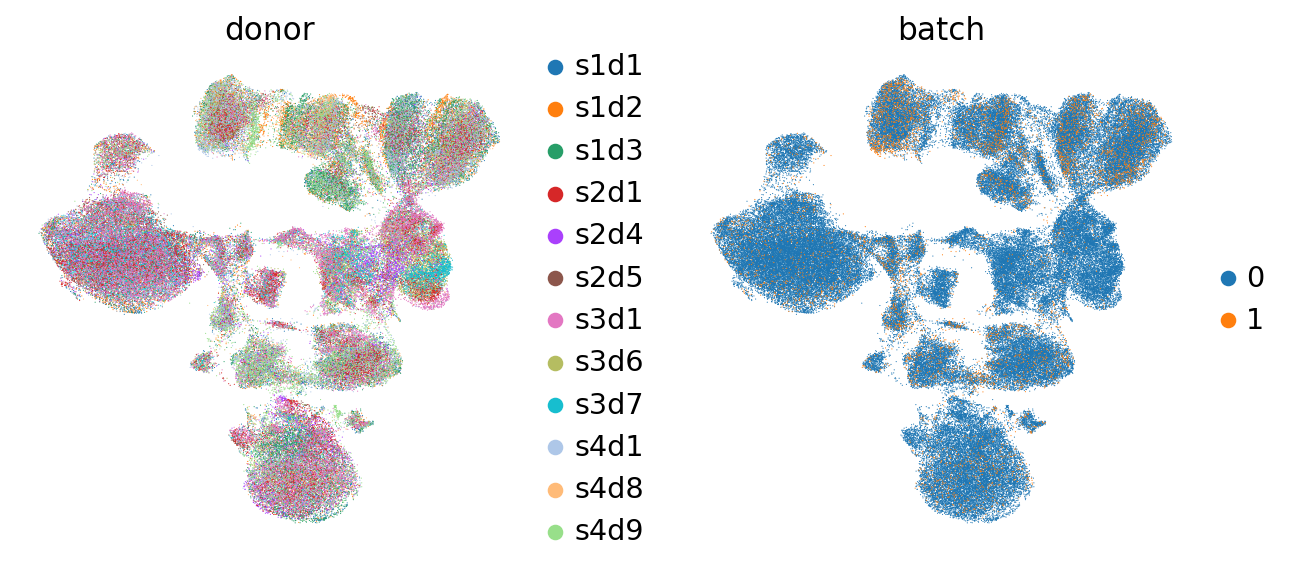
可以看到,与之前相比,不同供体的细胞在嵌入中的混合程度高了很多(见 降维 章节)。
sc.pl.umap(mdata["prot"], color=["CD4-1", "CD8", "CD3"])
sc.pl.umap(mdata["prot"], color=["CD14-1", "CD16"])
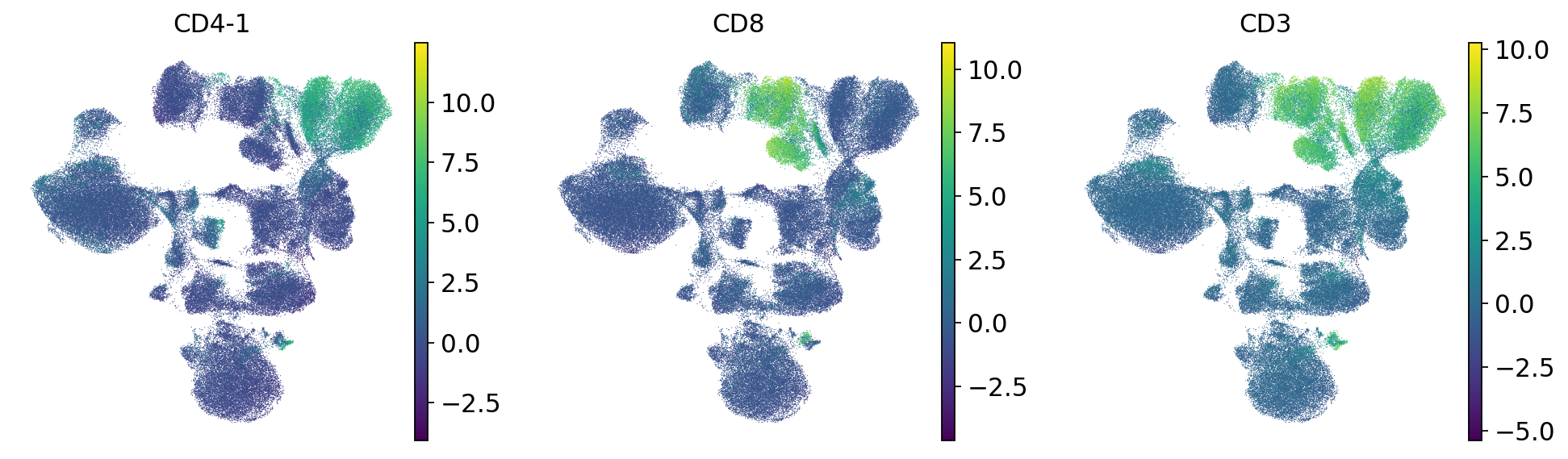
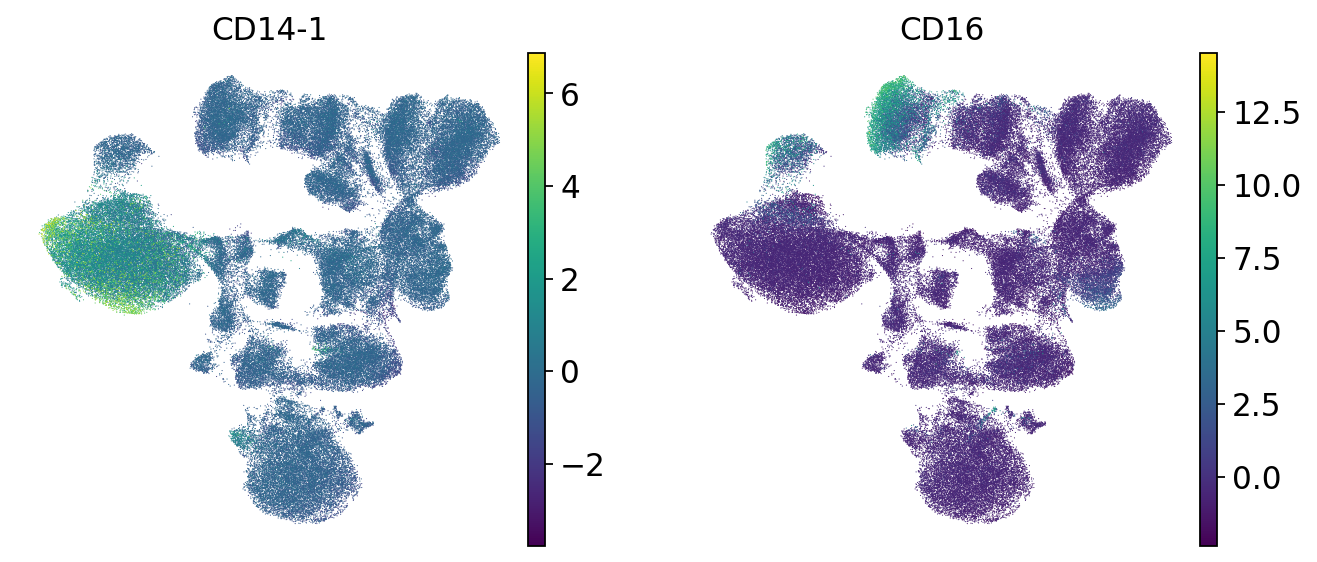
我们检查几个标记基因的表达,以确认不同的细胞类型之间仍然彼此分开。可以看到,T 细胞仍然形成一个独立的群体,并进一步分为 CD4 和 CD8 T 细胞。此外,与降维之前不同的是,现在 CD4 T 细胞形成了一个离散的聚类,其中各供体相互混合。因此,批次校正是成功的。
af_batch_correction = ln.Artifact.from_mudata(
    mdata,
    key="surface-protein/cite_batch_correction.h5mu",
    description="CITE-seq data after batch correction",
)
af_batch_correction.save()
ln.finish()
38.5. 参考文献#
Florian Ingelfinger, Nathan Levy, Can Ergen, Artemy Bakulin, Alexander Becker, Pierre Boyeau, Martin Kim, Diana Ditz, Jan Dirks, Jonas Maaskola, and others. Cytovi: deep generative modeling of antibody-based single cell technologies. bioRxiv, pages 2025–09, 2025.
Ilya Korsunsky, Nghia Millard, Jean Fan, Kamil Slowikowski, Fan Zhang, Kevin Wei, Yuriy Baglaenko, Michael Brenner, Po-ru Loh, and Soumya Raychaudhuri. Fast, sensitive and accurate integration of single-cell data with harmony. Nature Methods, 16(12):1289–1296, Dec 2019. URL: https://doi.org/10.1038/s41592-019-0619-0, doi:10.1038/s41592-019-0619-0.
Ye Zheng, Daniel P Caron, Ju Yeong Kim, Seong-Hwan Jun, Yuan Tian, Florian Mair, Kenneth D Stuart, Peter A Sims, and Raphael Gottardo. Adtnorm: robust integration of single-cell protein measurement across cite-seq datasets. Nature communications, 16(1):5852, 2025.
38.6. 贡献者#
我们衷心感谢以下人员的贡献:
38.6.2. 审阅者#
Lukas Heumos
Anna Schaar